上架截圖
iOS
3.5 inch - 640*960
4.0 inch - 640*1136
4.7 inch - 750*1334
5.5 inch - 1242*2208
Android
邊長下限:320px;邊長上限:3840px。
======
APP Icon
iOS - 1024*1024
Android - 512*512
2015年10月1日 星期四

2015年4月26日 星期日
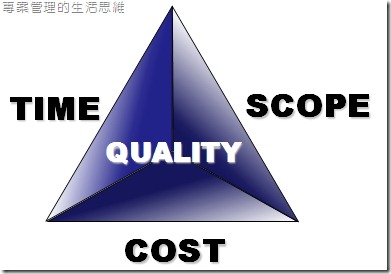
專案管理-專案金三角
專案金三角 Triple Constrain
簡單說就是一個專案當中拿來評估的三個基本因子:
時間 Time
範圍 Scope
成本 Cose
這三個因子剛好可以組成一個三角形,彼此影響著。
三角形的中間就是
品質 Quality

簡單說就是一個專案當中拿來評估的三個基本因子:
時間 Time
範圍 Scope
成本 Cose
這三個因子剛好可以組成一個三角形,彼此影響著。
三角形的中間就是
品質 Quality
2015年1月17日 星期六
軟體專案管理
會寫這篇文章,其實是因為前陣子公司接了個軟體專案,
需要寫一些文件,一些名詞縮寫,可以說是有聽沒有懂,
所以寫這個網誌作個備註。
RFI
Request For Information-需求說明書/需求構想書
SOW
Statement Of Work-工作說明書/建置工作條款
RFP
Request For Porposal-需求規格書/需求規格說明書
SIT
System Integration Test-系統整合測試
UAT
User Acceptance Test-使用者驗收測試
BST
Business Suimlation Test-前端驗收測試
-
WBS
Work Breakdowm Structur-工作分解結構
參考link
http://www.digitimes.com.tw/tw/dt/n/shwnws.asp?cnlid=13&cat=&id=0000054431_B6331E5D8M2ZW7A2A9D9I
需要寫一些文件,一些名詞縮寫,可以說是有聽沒有懂,
所以寫這個網誌作個備註。
RFI
Request For Information-需求說明書/需求構想書
SOW
Statement Of Work-工作說明書/建置工作條款
RFP
Request For Porposal-需求規格書/需求規格說明書
SIT
System Integration Test-系統整合測試
UAT
User Acceptance Test-使用者驗收測試
BST
Business Suimlation Test-前端驗收測試
-
WBS
Work Breakdowm Structur-工作分解結構
參考link
http://www.digitimes.com.tw/tw/dt/n/shwnws.asp?cnlid=13&cat=&id=0000054431_B6331E5D8M2ZW7A2A9D9I
2015年1月6日 星期二
Android-筆記 Open Facebook App
之前讓使用者拜訪 Facebook 的時候,
基本上就是先檢查有沒有安裝Facebook,沒有的話就用一般瀏覽器開啟。
http://stackoverflow.com/questions/10788247/opening-facebook-app-on-specified-profile-page
http://stackoverflow.com/questions/4191492/launch-facebook-app-from-other-app
都是開啟網頁,覺得不是很理想,
後來想到之前有和其它開發者聊到,
寫在這邊備忘。
private Intent openFacebook() {

 Context context = this;

 try {
     context.getPackageManager().getPackageInfo("com.facebook.katana", 0);
      //Checks if FB is even installed.
     return new Intent(Intent.ACTION_VIEW, Uri.parse("fb://profile/254175194653125"));
     //Trys to make intent with FB's URI
 } catch (Exception e) {
     return new Intent(Intent.ACTION_VIEW, Uri.parse("https://www.facebook.com/sentiapps"));
     //catches and opens a url to the desired page
 }
}
上面的範例是打開個人專頁,如果要開粉絲團,要改一下Type。
facebook:/chat
facebook:/events
facebook:/friends
facebook:/inbox
facebook:/info
facebook:/newsfeed
facebook:/places
facebook:/requests
facebook:/wall

fb://root
fb://feed
fb://feed/{userID}
fb://profile
fb://profile/{userID}
fb://page/{id}
fb://group/{id}
fb://place/fw?pid={id}
fb://profile/{#user_id}/wall
fb://profile/{#user_id}/info
fb://profile/{#user_id}/photos
fb://profile/{#user_id}/mutualfriends
fb://profile/{#user_id}/friends
fb://profile/{#user_id}/fans
fb://search
fb://friends
fb://pages
fb://messaging
fb://messaging/{#user_id}
fb://online
fb://requests
fb://events
fb://places
fb://birthdays
fb://notes
fb://places
fb://groups
fb://notifications
fb://albums
fb://album/{%s}?owner={#%s}
fb://video/?href={href}
fb://post/{postid}?owner={uid}¹
參考文件
http://stackoverflow.com/questions/10788247/opening-facebook-app-on-specified-profile-page
http://stackoverflow.com/questions/4191492/launch-facebook-app-from-other-app
2014年12月29日 星期一
Android-筆記 AutoScrollViewPager & PageIndicator
很實用的文章
http://blog.csdn.net/za5419479/article/details/40979857
-
主要是讓 ViewPager 可以自動輪播,
並且兼容 PageIndicator 指示器,
因為數值過大而不 Work。
-
在 Demo 中,使用了圖片的 R.ID 來作 adapter,
在 AdverImagePagerAdapter中,
因為圖片會來自網路, 所以我把 R.ID 改成 ImageView
http://blog.csdn.net/za5419479/article/details/40979857
-
主要是讓 ViewPager 可以自動輪播,
並且兼容 PageIndicator 指示器,
因為數值過大而不 Work。
-
在 Demo 中,使用了圖片的 R.ID 來作 adapter,
在 AdverImagePagerAdapter中,
因為圖片會來自網路, 所以我把 R.ID 改成 ImageView
// private ListimageIdList; private List imageIdList;
 @Override
 public View getView(int position, View view, ViewGroup container) {
  ViewHolder holder;
//  if (view == null) {
//   holder = new ViewHolder();
//   view = holder.imageView = new ImageView(context);
//   holder.imageView.setScaleType(ImageView.ScaleType.FIT_XY);
//   view.setTag(holder);
//  } else {
//   holder = (ViewHolder) view.getTag();
//  }
//  holder.imageView.setImageResource(imageIdList.get(getPosition(position)));

  if(view == null) {
   holder = new ViewHolder();
   view = holder.imageView = new ImageView(context);
   holder.imageView.setScaleType(ImageView.ScaleType.FIT_XY);
   view.setTag(holder);
  } else {
   holder = (ViewHolder) view.getTag();
  }

  ImageView viewSrc = imageIdList.get(getPosition(position));
  holder.imageView.setImageDrawable(viewSrc.getDrawable());

  return view;
 }
2014年12月11日 星期四
Android-筆記 HttpGet
     private String httpGetData(String url) {

          String strResult = null;

          try {
              HttpGet get = new HttpGet(url);
              HttpResponse httpResponse = new DefaultHttpClient().execute(get);
              strResult = EntityUtils.toString(httpResponse.getEntity(), HTTP.UTF_8);
          } catch (ClientProtocolException e) {
              e.printStackTrace();
          } catch (IOException e) {
              e.printStackTrace();
          }

          return strResult;
      }
Android-筆記 HttpPost
     private String httpPostData(String url) {

          String strResult = null;

          List params = new ArrayList();
          params.add(new BasicNameValuePair("key", "value"));

          try {
               HttpPost httpPost = new HttpPost(url);
               httpPost.setEntity(new UrlEncodedFormEntity(params, HTTP.UTF_8));
               HttpResponse httpResponse = new DefaultHttpClient().execute(httpPost);

               if (httpResponse.getStatusLine().getStatusCode() == 200) {
                    strResult = EntityUtils.toString(httpResponse.getEntity(), HTTP.UTF_8);
               }
          } catch (ClientProtocolException e) {
               e.printStackTrace();
          } catch (IOException e) {
               e.printStackTrace();
          } catch (Exception e) {
               e.printStackTrace();
          }

          return strResult;
     }
訂閱:
文章 (Atom)